Tag Archives: sysadmin

VPN blocking and breaking with VPN blacklists

Before you splash out on a VPN its worth thinking about how the BBC (and NetFlix etc) can block and break them by using VPN blacklists:

VPN blacklists


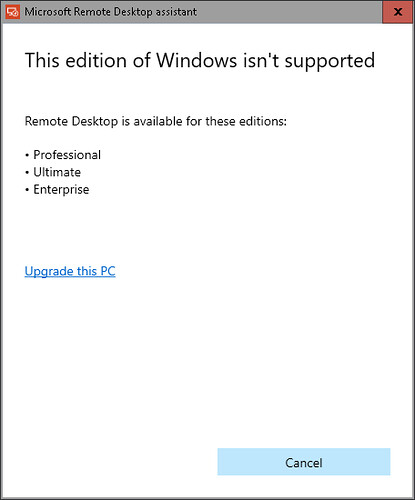
windows 10 home does not support rdp @microsoftuk #fail

windows 10 home does not support rdp so you will have to upgrade to windows 10 pro before you can use the rdp client

https://www.microsoft.com/en-us/download/details.aspx?id=50042

windows 10 home rdp

VPNs from @themarysue but which #vpn is best ?

these 3 all seem to offer desktop and mobile osx, windows, android and ios clients

anonvpn

purevpn

zenmate


if your are insterested instead of the paying monthy or annually you can get a lifetime deal for under £80 from themarysue

but apparently they will break netflix

see also

and most free vpns seem to have serious limitations or funded by ads

PC Benchmarking Tools

PC Benchmarking Tools

Linux

Windows 7 & 10

avoid @nsa #surveillance by using #secure email and a #secure vpn from @riseuplabs

avoid @nsa #surveillance by using #secure email and a #secure vpn from @riseuplabs

RISE UP

SECURE EMAIL

SECURE VPN

#windows 7 windows 8 #windows10 you can delete the recovery partition by using #diskpart #sysadmin

on windows 7 windows 8 windows 10 dont delete the “recovery partition” BEFORE you have created a “system repair disk” but once you have you can then delete the “recovery partition” by using diskpart

by using diskpart

if you have deleted the “recovery partition” BEFORE creating your system repair CD you will need to create Windows 10 ISOs by downloading and running the ISO downloader

on windows 7 windows 8 windows 10 you can delete windows.old by using diskcleanup

before buying a #domain from @123-reg, @godaddy or @ovh check that #dnssec is included #netadmin #sysadmin #security

ive just had three quotes £20+tax, £30, £60 for a couple of domains from 123-reg, godaddy and ovh domain registrars

interestingly godaddy and ovh now show trademark disclaimers

domain disclaimer

domain disclaimer

i ended up chosing OVH (not the cheapest) because they have additional services included for free:

Activation of the OVH Whois Obfuscator

The free OwO service enables you to hide your personal information, WHOIS for domains ending with the following extensions: .com, .net, .org, .info, .biz, .mobi, .cc, .tv and .me .

For further information, please see our guide: OwO (OVH Whois Obfuscator)

http://help.ovh.co.uk/owo

Activation of the DNSSEC protocol

The free activation of the DNSSEC protocol allows you to protect your domain against cache poisoning and to fill some inherent gaps in the DNS protocol designed to falsify answers from DNS servers. If you tick this box, the DNSSEC option will be enabled on your domain from its registration, seamlessly. Otherwise you will be able to activate DNSSEC at any time via your manager.

For further information, please check our DNSSEC presentation sheet.

https://www.ovh.co.uk/domains/dnssec_service.xml

basic free-of-charge website monitoring from #teamviewer #monitis #monitorus #devops #syadmin #webdev

basic free-of-charge website monitoring from teamviewer monitis monitorus

howo install #synergy-project keyboad and mouse sharing app on #ed/x/ubuntu

howo install synergy-project keyboad and mouse sharing app on ed/x/ubuntu

download deb from http://synergy-project.org/download/free/

aptitude does not let you install local debs and dkpg doesnt fix dependencies so either

aptitude install libqtcore4 libqtgui4 libqt4-network

before you run dkpg or

aptitude install gdebi

and use gdebi or gdebi-gtk to install synergy-1.4.18-r2250-Linux-x86_64.deb

@webmin download shorturl http://goo.gl/mCbG4i for @bitnami and other vms

https://wiki.bitnami.com/Virtual_Appliances_Quick_Start_Guide#How_to_install_Webmin.3f and if you dont typing you can use this @webmin download shorturl http://goo.gl/mCbG4i for @bitnami and other vms instead of

wget http://downloads.sourceforge.net/project/webadmin/webmin/1.550/webmin-1.550.tar.gz