although we are normally focused on server dev i though it might be worth posting this since native desktop C++ development seems to be making a bit of a comeback as a side effect of growth of ardunio, arm & IOT
amd
mingw
oracle
microsoft
theia

although we are normally focused on server dev i though it might be worth posting this since native desktop C++ development seems to be making a bit of a comeback as a side effect of growth of ardunio, arm & IOT
amd
mingw
oracle
microsoft
theia
microcode – everything you ever wanted to know
you need forget everything you thought you knew about microcode was in the old Z80 days
run cat /proc/cpuinfo to see what cpu chip & microcode version you have
$ cat /proc/cpuinfo
vendor_id : GenuineIntel
cpu family : 6
model : 69
model name : Intel(R) Core(TM) i5-4310U CPU @ 2.00GHz
microcode : 0x1d
flags : fpu vme de pse tsc msr pae mce cx8 apic sep mtrr
pge mca cmov pat pse36 clflush mmx fxsr sse sse2 ss syscall
nx pdpe1gb rdtscp lm constant_tsc arch_perfmon nopl xtopology
tsc_reliable nonstop_tsc eagerfpu pni pclmulqdq ssse3 fma cx16
pcid sse4_1 sse4_2 x2apic movbe popcnt tsc_deadline_timer aes
xsave avx f16c rdrand hypervisor lahf_lm abm invpcid_single
retpoline kaiser fsgsbase tsc_adjust bmi1 avx2 smep bmi2
invpcid xsaveopt arat
bugs : cpu_meltdown spectre_v1 spectre_v2
bogomips : 5202.00
have a look at your logs to see if you have any microcode patches
dmesg | grep "microcode"

journalctl -b -k | grep "microcode"
you need to enable nonfree deb/rpm repos so you get access to microcode packages
deb http://deb.debian.org/debian jessie main contrib non-free
deb http://security.debian.org/ jessie/updates main contrib non-free
then install the microcode package
aptitude update
aptitude install amd64-microcode
check your kernels params and reboot
Notes
Unfortunately, the license of the microcode update data from AMD and Intel are not compatible with the Debian Free Software Guidelines.
Therefore, microcode update data will be available through the non-free distribution. The new processor microcode update system is available for both non-free Wheezy and non-free Squeeze (through the backports repository).
Meltdown (the vulnerability affecting only Intel chips) cannot be fixed with microcode updates alone and requires changes to core OS functionality, which may reduce performance further.
Spectre (the vulnerability affecting Intel, AMD and ARM chips) may be able to be worked around with microcode updates alone.
windows vista isnt dead just yet although after installing SP2 windows update hangs and svchost will use 100% CPU and 1G continuously for many days
so the first thing you have to do after installing SP2 is disable automatic updates
then manually install
alternatively the guardian recommend you throw away any amd sempron notebooks and switch to a free unactivated or beta version of windows 10
or buy a refurb notebook
while wired has some other suggestions

DDR2 and DDR3 memory for desktops and notebooks is now available in 3 types (@amd, @intel and dualmode)
See
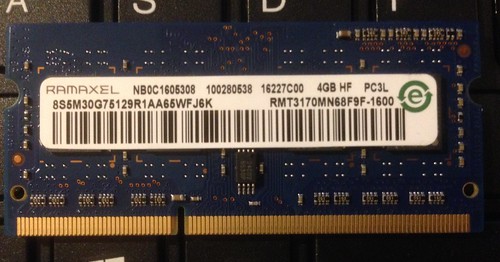
lost a few hours yesterday to some hp & lenovo and amd & intel memory bus nightmares started when i tried swapping DDR3 / PC3 / PC3L ram between an HP and two LENOVO notebooks
Basically the T41o refused to work with any of the other memory whereas i thought DDR3 ram was downwards compatible.
Actually just looking at my photos maybe PC3L is not downwards compatible with PC3 ?

According to http://www.debian-administration.org/articles/534 Intel initially chose not to extend their IA-32 processor family to 64 bits, preferring to promote their own but incompatible HP PA-RISC based IA-64 "Itanium" processor family !
but then Intel adopted AMD's 64-bit extensions into their IA-32 processor family, calling them "Intel 64" (aka IA-32e and EMT64). Final generation Pentium 4 & D, Celeron D, and Xeon processors and all "Core 2" based processors now include AMD compatible 64-bit extensions.
To add to the confusion https://help.ubuntu.com/community/ProcessorArch lists a few dozen Intel processors but doesn't make it clear which type a Pentium DualCore is ! Which is what my Compaq A900 notebook says it has in it !
I have 4G of RAM that I have only been able to access 3G of so far (with 4 different OS's)
Update :
It seems that my Pentium DualCore has PAE (?) support and when I install from the Xubuntu x86 (32-bit ?) CD I CAN see all 4G ! So what benefits if any would I get from using the Xubuntu 64-bit (AMD64) CD instead ?
My SONY PIII says it is:
$ cat /proc/cpuinfo
processor : 0
vendor_id : GenuineIntel
cpu family : 6
model : 13
model name : Intel(R) Pentium(R) M processor 1.50GHz
cpuid level : 2
flags : fpu vme de pse tsc msr mce cx8 sep mtrr pge mca cmov pat clflush dts acpi mmx fxsr sse sse2 ss tm pbe up bts est tm2
My Compaq Pentium Dual Core says it is:
$ cat /proc/cpuinfo
processor : 0
vendor_id : GenuineIntel
cpu family : 6
model : 15
model name : Intel(R) Pentium(R) Dual CPU T2390 @ 1.86GHz
cpuid level : 10
flags : fpu vme de pse tsc msr pae mce cx8 apic sep mtrr pge mca cmov pat pse36 clflush dts acpi mmx fxsr sse sse2 ss ht tm pbe nx lm constant_tsc arch_perfmon pebs bts pni dtes64 monitor ds_cpl est tm2 ssse3 cx16 xtpr pdcm lahf_lm
TESCO Intel Celeron £140 Ubuntu PC
TESCO AMD Athlon £190 Ubuntu PC
As well as Ubuntu these PCs also include http://www.openoffice.org/
The 3D virtual reality AMD marketing expo
which is even eco friendly since you get a virtual plastic bag to drag all your pdfs into !
was created by
There is yet another virtualisation technology on the block !
http://www.vizzr.info/2007/04/24/kernel-virtual-machine-kvm/
kvm only run on processors that supports x86 hvm (vt/svm instructions set) whereas Xen also allows running modified operating systems on non-hvm x86 processors using a technique called paravirtualization. kvm does not support paravirtualization for cpu but may support paravirtualization for device drivers to improve I/O performance.
kvm FAQ
Proprietary vendors take note :
Xen and kvm make use of Intel-VT and AMD-V hardware virtualisation features !
 OSDE8INFO