Tag Archives: sysadmin

ovh vps cloud vms

Just in the process of moving all my web hosting to OVH VPS cloud VMs and thought it’d be useful to document how to turn a vanilla OVH VPS into a personal multi-site webhost !

  • use OVH control panel to replace debian with centos
  • add a user
  • disable root ssh login
  • restart sshd
  • disable/uninstall unnessesary services such as smartmontools yum-updatesd
  • yum check-update
  • run system-config-security
  • yum install redhat-lsb
  • rpm install rpmforge-release
  • yum install fail2ban
  • replace sendmail with postfix (unless you like sendmail)
  • install LAMP (inc httpd,mod_ssl and PHP 5.3.3)
  • secure mysql (change root pwd and delete guest accounts & dbs)
  • chkconfig httpd and mysqld on
  • yum install perl-Crypt-SSLeay perl-Net-SSLeay
  • yum install webalizer
  • install webmin
  • secure webmin (change user & port)
  • install virtualmin
  • enable https
  • disable virtualhost mail handling (unless your not using goog apps)
  • install rrdtools
  • install webmin systemstats
  • create virtual hosts
  • scp public_html tgz and mysql sql dumps from old webhost
  • untar tgz and mysql < sql
  • change DNS ip addresses from old webhost to new webhost
  • wait 1 min !
  • check new site is running !

ubuntu renamed

Ubuntu Name Changes

Ubuntu Netbook Edition and Ubuntu Desktop Edition have been combined into a single Edition called simply “Ubuntu”

(with no “Edition”).

http://www.ubuntu.com/testing

http://www.ubuntu.com/testing/natty/beta

http://releases.ubuntu.com/natty/

howto turn off fast user switching

To turn off Windoz 7 Fast User Switching

  • Run gpedit.msc
  • Goto Computer Configuration | Administrative Templates | System | Logon
  • Double-click “Hide entry points for Fast User Switching Properties”
  • Click Enabled
  • Click OK.

web security links

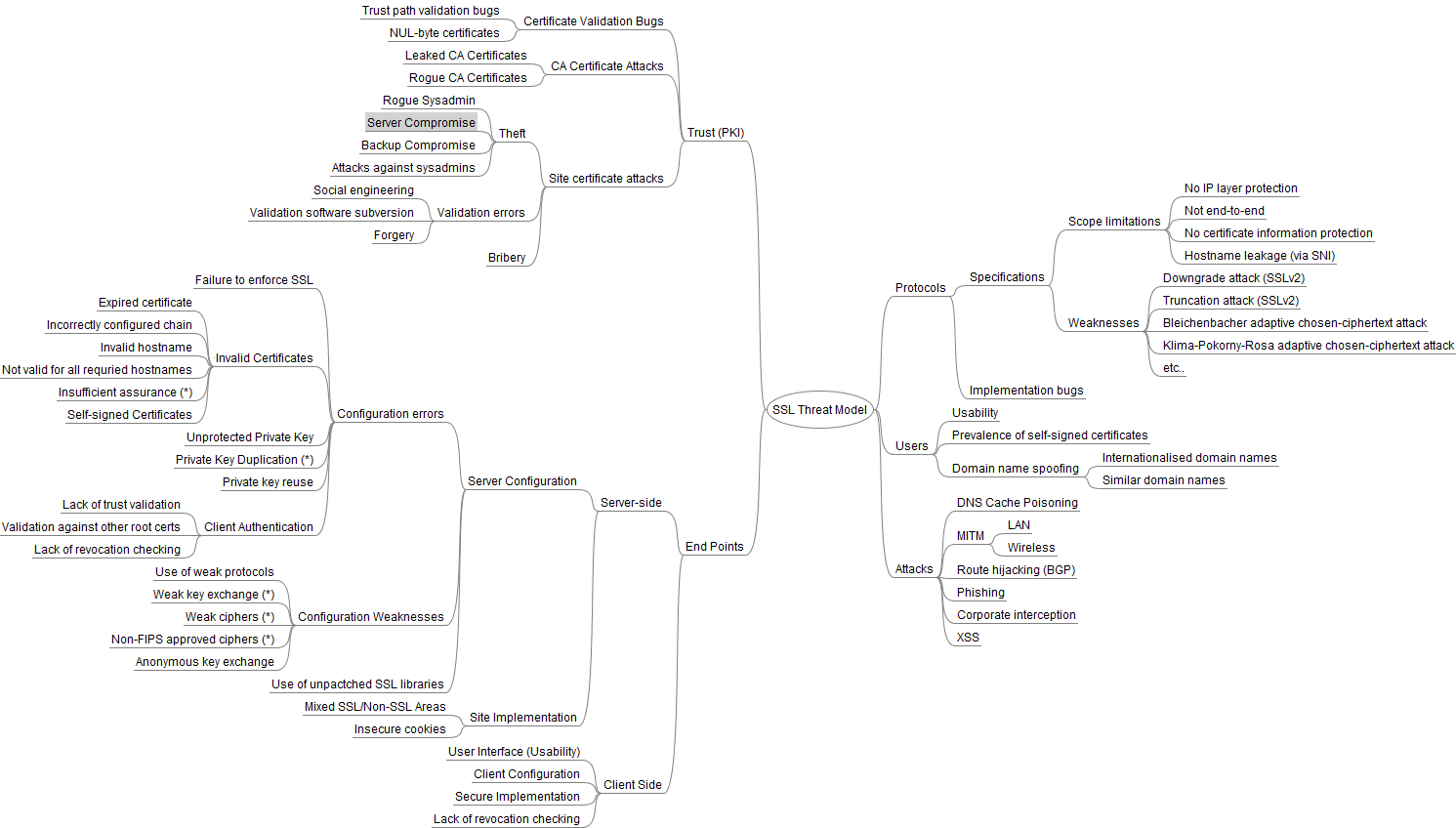
web https ssl security links

Virgin Media Cable Netgear VMDG280

Virgin Media have just updated my Cisco Cable Modem to a Netgear VMDG280 Wi-Fi Router however there are a couple of gotchas to watch out for:

  • you cant run the reqd initial configuration from gnu/linux and firefox
  • you cant run the reqd initial configuration from an ipad and safari

you have to configure it from a windoz pc with ie or firefox BEFORE you can access the internet !

 
IMG_20110317_213431

StartSSL SSL certs

StartSSL™ offer Free (Class 1) certificates which are domain or email validated.

Because the checks are performed mostly by electronic means, they require only minimal human intervention from our side. The validations are here to make sure, that the subscriber is the owner of the domain name, resp. email account.

The StartSSL™ Free certificates are intended for web sites which require protection of privacy and prevent eavesdropping. However information presented within these certificates, except the domain name and email address, are not verified.

Should you need higher validated certification check out our StartSSL™ Verified (Class 2) certificates.

and ssllabs.com have a free online service @ ssllabs.com/ssldb/index.html that

  • can perform a deep analysis of the configuration of any SSL web server on the public Internet !

apache httpd ssl

apache httpd ssl using virtualmin and webmin

python funkload loadtesting

howto get python funkload loadtesting working

install python 2.6

install funkload

fix webunit bugs

# vi /usr/lib/python2.6/dist-packages/webunit/cookie.py

# domain-match the Domain attribute.
##if not server.endswith(domain):
##if not domain.endswith(server):
if not (domain.endswith(server) or server.endswith(domain)):
raise Error, ‘Cookie domain “%s” doesn\’t match ‘\
‘request host “%s”‘%(domain, server)
# reject if The request-host is a FQDN (not IP address) and
# has the form HD, where D is the value of the Domain
# attribute, and H is a string that contains one or more dots.
## if re.search(r'[a-zA-Z]’, server):
## H = server[:-len(domain)]
## if ‘.’ in H:
## raise Error, ‘Cookie domain “%s” too short ‘\
## ‘for request host “%s”‘%(domain, server)

record a test by running the funkload proxy and setting firefox browser to use it

$ fl-record mywebsite
^C

should create

Mywebsite.conf
test_Mywebsite.py

autorun the test

$ fl-run-test -dv test_Mywebsite.py

autorun bench test(s)

$ fl-run-bench test_Mywebsite.py Mywebsite.test_mywebsite

$ fl-run-bench -c1:10:20 test_Mywebsite.py Mywebsite.test_mywebsite

create text and html reports

$ fl-build-report –no-percentiles mywebsite-bench.xml >mywebsite.txt
$ cat ~/efip.txt

$ fl-build-report –html –no-percentiles mywebsite-bench.xml
$ firefox file:///~/test_efip-20110309T173138/index.html

NOTE: watch out for correct use of case of mywebsite and Mywebsite